Showing posts with label web api. Show all posts

Friday, July 3, 2020

Content Negotiation in Web API

We know that there are three pillars of the internet, they are:

  • The resource
  • The URL
  • The representation

The first two are very straight forward but the last one is a little confusing to understand. The representation is very important in the modern web. Why? People are currently not only using Desktop computers to browse the web, they are using various types of devices to consume web applications. And the interesting fact is that the various devices expect data in various formats.

For examle a few want data in normal HTML format and some in normat text format. Others need the JSON format and still others in XML format.

The formal definition of Content Negotiation as “the process of selecting the best representation for a given response when there are multiple representations available”.

Now, the fact should be clear, “Content Negotiation” means the client and server can negotiate. It’s not always possible for the server to return data in the requested format. That’s why it’s called negotiation, not demand. Ha.Ha.And in this case the service will return data in the default format.

The question is, how does the Web API know what the clinet expects? By checking below the header of the request object.

Content-type: which request to API to represent data in this type.

Accept: The acceptable media types for the response, such as “application/json,” “application/xml,” or a custom media type such as "application/vnd.example+xml".

Accept-Charset: The acceptable character sets, such as UTF-8 or ISO 8859-1.

Accept-Encoding: 
The acceptable content encodings, such as gzip.

Accept-Language: The preferred natural language, such as “en-us”.

Those are four headers of the request object for the request to the server to represent data in the requested way if possible.

In this example we will implement a simple Web API application and using Fiddler too we will request the Web API to return data in our preferred format. So, let’s start with an example.

Oh, before proceeding to the example I would like to clear up one more concept. We will provide those header values in this format.

Superset/Subset

For example, if the value is "application/json" then the “application is representing the super set” and “json” is the subset of the “application” super set.

If we specify “application/xml” then again “application” is the superset and “xml” is the subset of the application.

Fine, so let’s proceed to the example.

  1. Request data in JSON format

This is currently the most popular format of data representation. So, so first we will see to return data in JSON format from the Web API.

Here is our HTTP header information with  HttpRequest message

User-Agent: Fiddler

Host: localhost:11129


Now, we are seeing that we did not set Content-Type header to request data in JSON format . But Web API is returning data in JSON format. The reason is “If we do not specify any “Content-Type” then by default Web API will return JSON data. Like the following output.

Web API

And obviously we could modify the header set like the following to get data in JSON format.

User-Agent: Fiddler

Content-type: application/json

Host: localhost:11129

Both requests will provide the same output in reality.

  1. Request data in XML format

In this example we will request the Web API to return data in XML format. A few years ago this XML would instead be in JSON format. When the application used SOAP based messages (it’s not that SOAP is obsolete in modern applications, it’s still there but people like to use smarter JSON rather than too much informative and stuffy XML).
Now to get data in XML format we need to set the Content-Type header of HttpRequest. Here is an example header set for the following output.

User-Agent: Fiddler

Content-type: application/xml

Host: localhost:11129


And, as out content-type header indicates we are getting data in XML format.

.NET WEB API

Now, those are the two formats that the Web API can supply by default. If we want various types of representations then we need to implement a media type formatter in the Web API.

Understand Accept Header in HttpRequest

In previous examples we saw how a content-type header works with HttpRequest. In this example we will understand the “Accept” header of HttpRequest.

By checking the “Accept” header , the Web API understands which representation the client is able to accept. For example, if we specify that the client can understand the following representation:

application/xml , application/json, text/javascript

Then the Web API will return data in JSON format, the reason is JSON is the default format of the Web API, althought the client’s first preference is the XML format. We will prove it with a small example. Have a look at the following screen.

WEB API CLIENT

Here we have specified that the accept type is as in the following:

application/xml , application/json, text/javascript

And in the response we are getting data in JSON format although we have specified the following:

Content-Type: application/xml

So, here the Web API is ignoring the Content-type header.

Understand Accept-Language header

In the Accept-Language header we can specify the preferred language that we want to get from the Web API application. The Accept-Language header is as in the following:

Accept-Language: en-IN, en-US

It indicates that my first choice is Indian English but if that is not possible then please give me US English and if that is not possible then please provide the data in the default language.

Conclusion

This article has explaind Content Negotiation in the Web API and it’s clients. Modern web based applications can provide data in various languages. So, if we develop our API to cover global users across the world, then Content Negotiation is relevant.

Difference between SOAP And REST APIs

I am sure everyone of us has sign-up in an online shopping website at least once. Let me consider Myntra or Paytm. When you visit the site, you come across three ways of signing up, either you can use your Facebook or Google credentials or can simply fill up a registration form for the same. When you select Google and you are only asked for your google credentials and your Myntra account is created in fraction of seconds. Isn’t that great!! But the question here is, does Myntra has access to Google’s database? OBVIOUSLY NOT!! Myntra has simply integrated Google API within their website.

Now what is this API in front of Google? When you click on Google to sign-up, Myntra takes your credentials and forwards them to Google and Google sends the user data like user Name, Image, Email Id as a response which is utilized by Myntra to create the account. In short, there is some sort of data exchange between two domains, Myntra and Google. So, the one who is responsible to process the request-response communication is known as API – Application Programming Interface. APIs are few lines of code which takes the request from the requester and gives back the response in form of data. Few of you must be thinking how can I integrate google in my website? The link for more details https://developers.google.com/identity/sign-in/web/sign-in.

Web Service

If we think of Google functionalities which can be integrated in our application, we have Google Maps, Google Search, Gmail and many more. The link for more details https://developers.google.com/apis-explorer/#p/.

So, when you click on Google button, in the above example, along with your credentials, a keyword denoting which service Myntra is willing to access is sent to Google. Google in turn reads the keyword and hits the desired HTTP request to call the Sign-in API viz the Gmail API. This kind of communication which involves HTTP or Network is known as a Web Service. Similarly, websites like Shine.com, Zomato also uses Google Gmail API for user registration/sign up irrespective of the platform the websites are written in, viz. Java, .Net, PHP.

Are API And Web Services Similar?

An obvious question which popped-up in your mind is, So Web Service and API are same, right? My answer is, IT’S NOT. All web services are API but not all APIs are web service. Confused?? Let me explain.

As I mentioned earlier APIs are few lines of code which takes the request from the requester and gives back the response in form of data. Now suppose you are creating a utility class where you have written certain methods and can be reused in other different classes. In this case also we are exchanging data but not making use of any HTTP protocols or networks. Hence, I can term my utility class as an API but not as a Web Service. The most popular Web Service Protocols are

  1. SOAP – Simple Object Access Protocol

  2. REST – Representational State Transfer

Let’s start understanding them one by one.


SOAP based Web Service

Recently I mentioned that web services can be called by any application irrespective of the platform being used to write the code. Now imagine a scenario where this wouldn’t have been possible. So, for every platform, there must be a web service and for every web service managing different code, HTTP or network would result in difficult maintenance.

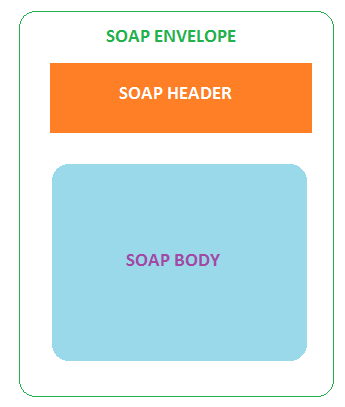
To enable different application to use the same web service, there has to be an intermediate language – XML (Extensible Markup Language). Almost every coding platform understands XML. But the drawback is XML don’t have any fixed specification across the programming languages. Hence to avoid such scenario, SOAP protocol was introduced.SOAP is an XML-Based protocol to work over HTTP which has few fixed specifications to be used across all programming languages.SOAP specification is known as SOAP Message. Following are the building blocks in a SOAP Message,

SOAP Envelope: Recognizes where the XML is a SOAP. This element is mandatory.

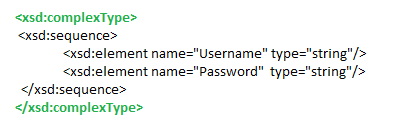
SOAP Header: Contains header information. For e.g. we need to pass username and password as a mandatory parameter in the request. We can define the same along with the datatypes under ComplexType tag. See below. This element is optional.

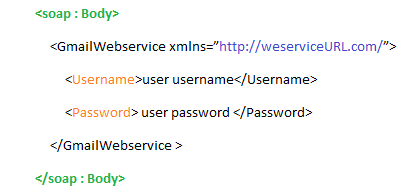
SOAP Body : Contains the web service URL and the elements to be passed with the request, i.e. ComplexType values.

To understand in more detail over SOAP request and Response, you can go through the below link http://www.soapuser.com/basics3.html

REST-based Web Service

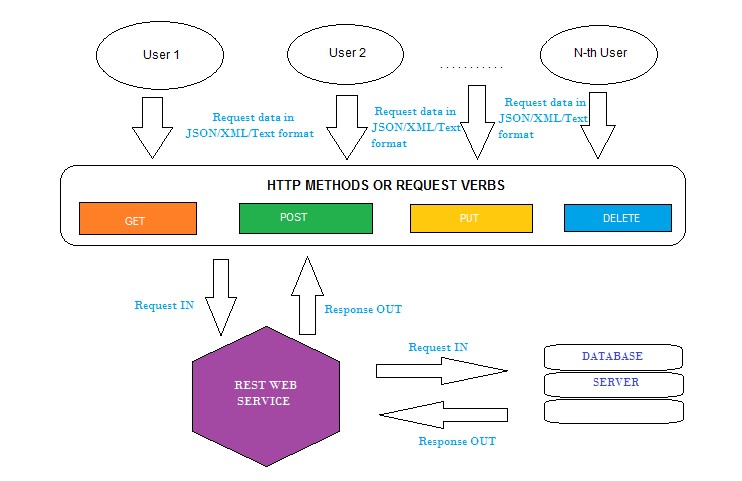
SOAP requires a good amount of bandwidth to exchange data. Due to the complex structure, a small group of developers came up with REST, architectural based web services, i.e. defined HTTP methods by which two applications can exchange data along with different formats like JSON, XML, Text to exchange data and response code to identify the response status. JSON is the most popular format.Following four HTTP methods are commonly used in REST-based architecture.

  • GET – to fetch data from the application

  • POST – if you want to send new data to the application for processing

  • DELETE – if you wish to remove an existing data

  • PUT – if you wish to update any existing data

    A REST implementation basically contains the below elements,

  • URL – This contains the web service URL.

  • HTTP Method – Describes what kind of request is the URL all about

  • Header – this element is used to tell the format in which the response is expected

  • Request Body – contains the requested web service details. It also contains the data you want to send to the other application.

  • Response Body – contains the data requested

  • Response Status code

Difference Between SOAP And REST

SOAP
REST
Slower due to defined specification
Faster as there is no defined specifications
Request and response format is always XML
Request and Response can be either in XML, JSON or plain text.
Requires bandwidth as the amount of data to transfer is a lot
Can work perfect even in case of low bandwidth
It is a protocol that defines some specifications which are to be followed strictly
Due to its architectural approach, it doesn’t have any strict specification
Less preferred due to its complex design
Easy to implement
Highly secure as it has its own security.
Doesn’t have its own security. Hence depends on application defined security
HTTP SSL Encryption and WS-Security encryption are used to secure SOAP messages
Data can be secured only by HTTP SSL Encryption
No need of caching mechanism
Requires caching mechanism
Can communicate over HTTP as well as SMTP
Can communicate only over HTTP

Choosing Between SOAP and REST

Use SOAP for,
  • if your application requires high level of security

  • Both consumer and provider should agree to the specification format

    Use REST for,
    • If each operation, i.e. Create, Read, Update, and Delete are independent of each other

    • If you need to cache any information

    • The bandwidth is limited

    Summary

    Selecting between SOAP and REST depends completely on the actual application requirements as there are many factors involved. Depending on them, one needs to check the benefits and decide upon the API. But as a heads up, I would like to conclude everything in a simple way. According to me, the applications, where exchanging data should be highly secure, for e.g. transaction security or processing data with BPEL, I would suggest using SOAP. On the other hand, applications that require fast responses, for e.g. social media, its advisable to use REST.


JSON and XML Serialization in ASP.NET Web API

JSON Media-Type Formatter

JSON formatting is provided by the JsonMediaTypeFormatter class. By default, JsonMediaTypeFormatter uses the Json.NET library to perform serialization. Json.NET is a third-party open source project.

If you prefer, you can configure the JsonMediaTypeFormatter class to use the DataContractJsonSerializer instead of Json.NET. To do so, set the UseDataContractJsonSerializer property to true


var json = GlobalConfiguration.Configuration.Formatters.JsonFormatter;

json.UseDataContractJsonSerializer = true;


XML Media-Type Formatter

XML formatting is provided by the XmlMediaTypeFormatter class. By default, XmlMediaTypeFormatter uses the DataContractSerializer class to perform serialization.

If you prefer, you can configure the XmlMediaTypeFormatter to use the XmlSerializer instead of the DataContractSerializer. To do so, set the UseXmlSerializer property to true:


var xml = GlobalConfiguration.Configuration.Formatters.XmlFormatter;

xml.UseXmlSerializer = true;

Action Results in Web API 2

A Web API controller action can return any of the following:

  1. void
  2. HttpResponseMessage
  3. IHttpActionResult
  4. Some other type

Depending on which of these is returned, Web API uses a different mechanism to create the HTTP response.

TABLE 1
Return typeHow Web API creates the response
voidReturn empty 204 (No Content)
HttpResponseMessageConvert directly to an HTTP response message.
IHttpActionResultCall ExecuteAsync to create an HttpResponseMessage, then convert to an HTTP response message.
Other typeWrite the serialized return value into the response body; return 200 (OK).

The rest of this topic describes each option in more detail.

void

If the return type is void, Web API simply returns an empty HTTP response with status code 204 (No Content).

Example controller:

C#
public class ValuesController : ApiController
{
    public void Post()
    {
    }
}

HTTP response:

Console
HTTP/1.1 204 No Content
Server: Microsoft-IIS/8.0
Date: Mon, 27 Jan 2014 02:13:26 GMT

HttpResponseMessage

If the action returns an HttpResponseMessage, Web API converts the return value directly into an HTTP response message, using the properties of the HttpResponseMessage object to populate the response.

This option gives you a lot of control over the response message. For example, the following controller action sets the Cache-Control header.

C#
public class ValuesController : ApiController
{
    public HttpResponseMessage Get()
    {
        HttpResponseMessage response = Request.CreateResponse(HttpStatusCode.OK, "value");
        response.Content = new StringContent("hello", Encoding.Unicode);
        response.Headers.CacheControl = new CacheControlHeaderValue()
        {
            MaxAge = TimeSpan.FromMinutes(20)
        };
        return response;
    } 
}

Response:

Console
HTTP/1.1 200 OK
Cache-Control: max-age=1200
Content-Length: 10
Content-Type: text/plain; charset=utf-16
Server: Microsoft-IIS/8.0
Date: Mon, 27 Jan 2014 08:53:35 GMT

hello

If you pass a domain model to the CreateResponse method, Web API uses a media formatter to write the serialized model into the response body.

C#
public HttpResponseMessage Get()
{
    // Get a list of products from a database.
    IEnumerable<Product> products = GetProductsFromDB();

    // Write the list to the response body.
    HttpResponseMessage response = Request.CreateResponse(HttpStatusCode.OK, products);
    return response;
}

Web API uses the Accept header in the request to choose the formatter. For more information, see Content Negotiation.

IHttpActionResult

The IHttpActionResult interface was introduced in Web API 2. Essentially, it defines an HttpResponseMessage factory. Here are some advantages of using the IHttpActionResult interface:

  • Simplifies unit testing your controllers.
  • Moves common logic for creating HTTP responses into separate classes.
  • Makes the intent of the controller action clearer, by hiding the low-level details of constructing the response.

IHttpActionResult contains a single method, ExecuteAsync, which asynchronously creates an HttpResponseMessage instance.

C#
public interface IHttpActionResult
{
    Task<HttpResponseMessage> ExecuteAsync(CancellationToken cancellationToken);
}

If a controller action returns an IHttpActionResult, Web API calls the ExecuteAsync method to create an HttpResponseMessage. Then it converts the HttpResponseMessage into an HTTP response message.

Here is a simple implementation of IHttpActionResult that creates a plain text response:

C#
public class TextResult : IHttpActionResult
{
    string _value;
    HttpRequestMessage _request;

    public TextResult(string value, HttpRequestMessage request)
    {
        _value = value;
        _request = request;
    }
    public Task<HttpResponseMessage> ExecuteAsync(CancellationToken cancellationToken)
    {
        var response = new HttpResponseMessage()
        {
            Content = new StringContent(_value),
            RequestMessage = _request
        };
        return Task.FromResult(response);
    }
}

Example controller action:

C#
public class ValuesController : ApiController
{
    public IHttpActionResult Get()
    {
        return new TextResult("hello", Request);
    }
}

Response:

Console
HTTP/1.1 200 OK
Content-Length: 5
Content-Type: text/plain; charset=utf-8
Server: Microsoft-IIS/8.0
Date: Mon, 27 Jan 2014 08:53:35 GMT

hello

More often, you use the IHttpActionResult implementations defined in the System.Web.Http.Results namespace. The ApiController class defines helper methods that return these built-in action results.

In the following example, if the request does not match an existing product ID, the controller calls ApiController.NotFound to create a 404 (Not Found) response. Otherwise, the controller calls ApiController.OK, which creates a 200 (OK) response that contains the product.

C#
public IHttpActionResult Get (int id)
{
    Product product = _repository.Get (id);
    if (product == null)
    {
        return NotFound(); // Returns a NotFoundResult
    }
    return Ok(product);  // Returns an OkNegotiatedContentResult
}

Other Return Types

For all other return types, Web API uses a media formatter to serialize the return value. Web API writes the serialized value into the response body. The response status code is 200 (OK).

C#
public class ProductsController : ApiController
{
    public IEnumerable<Product> Get()
    {
        return GetAllProductsFromDB();
    }
}

A disadvantage of this approach is that you cannot directly return an error code, such as 404. However, you can throw an HttpResponseException for error codes. For more information, see Exception Handling in ASP.NET Web API.

Web API uses the Accept header in the request to choose the formatter. For more information, see Content Negotiation.

Example request

Console
GET http://localhost/api/products HTTP/1.1
User-Agent: Fiddler
Host: localhost:24127
Accept: application/json

Example response

Console
HTTP/1.1 200 OK
Content-Type: application/json; charset=utf-8
Server: Microsoft-IIS/8.0
Date: Mon, 27 Jan 2014 08:53:35 GMT
Content-Length: 56

[{"Id":1,"Name":"Yo-yo","Category":"Toys","Price":6.95}]