Monday, July 6, 2020

Factory Method Design Pattern - C#

The UML class diagram for the implementation of the factory method design pattern is given below:
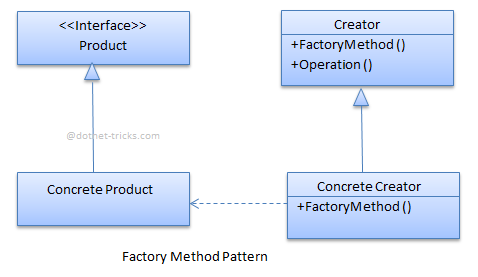
The classes, interfaces and objects in the above UML class diagram are as follows:

  1. Product

    This is an interface for creating the objects.

  2. ConcreteProduct

    This is a class which implements the Product interface.

  3. Creator

    This is an abstract class and declares the factory method, which returns an object of type Product.

  4. ConcreteCreator

    This is a class which implements the Creator class and overrides the factory method to return an instance of a ConcreteProduct.

C# - Implementation Code

interface Product
{

}

class ConcreteProductA : Product
{
}

class ConcreteProductB : Product
{
}

abstract class Creator
{
 public abstract Product FactoryMethod(string type);
}

class ConcreteCreator : Creator
{
 public override Product FactoryMethod(string type)
 {
 switch (type)
 {
 case "A": return new ConcreteProductA();
 case "B": return new ConcreteProductB();
 default: throw new ArgumentException("Invalid type", "type");
 }
 }
}

Factory Method Pattern - Example
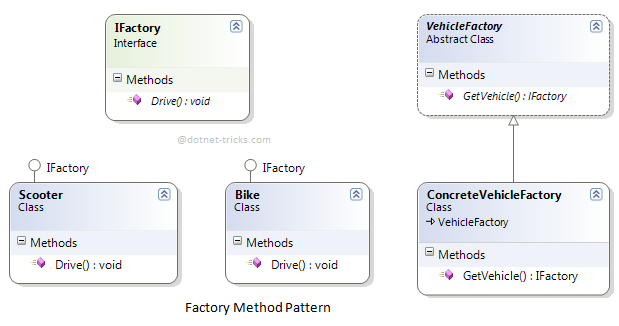
Who is what?

The classes, interfaces, and objects in the above class diagram can be identified as follows:

  1. IFactory - Interface

  2. Scooter & Bike - Concreate Product classes

  3. VehicleFactory - Creator

  4. ConcreteVehicleFactory - Concreate Creator

C# - Sample Code

using System;
namespace Factory
{
 /// <summary>
 /// The 'Product' interface
 /// </summary>
 public interface IFactory
 {
 void Drive(int miles);
 }

 /// <summary>
 /// A 'ConcreteProduct' class
 /// </summary>
 public class Scooter : IFactory
 {
 public void Drive(int miles)
 {
 Console.WriteLine("Drive the Scooter : " + miles.ToString() + "km");
 }
 }

 /// <summary>
 /// A 'ConcreteProduct' class
 /// </summary>
 public class Bike : IFactory
 {
 public void Drive(int miles)
 {
 Console.WriteLine("Drive the Bike : " + miles.ToString() + "km");
 }
 }

 /// <summary>
 /// The Creator Abstract Class
 /// </summary>
 public abstract class VehicleFactory
 {
 public abstract IFactory GetVehicle(string Vehicle);

 }

 /// <summary>
 /// A 'ConcreteCreator' class
 /// </summary>
 public class ConcreteVehicleFactory : VehicleFactory
 {
 public override IFactory GetVehicle(string Vehicle)
 {
 switch (Vehicle)
 {
 case "Scooter":
 return new Scooter();
 case "Bike":
 return new Bike();
 default:
 throw new ApplicationException(string.Format("Vehicle '{0}' cannot be created", Vehicle));
 }
 }

 }
 
 /// <summary>
 /// Factory Pattern Demo
 /// </summary>
 class Program
 {
 static void Main(string[] args)
 {
 VehicleFactory factory = new ConcreteVehicleFactory();

 IFactory scooter = factory.GetVehicle("Scooter");
 scooter.Drive(10);

 IFactory bike = factory.GetVehicle("Bike");
 bike.Drive(20);

 Console.ReadKey();

 }
 }
}

Factory Pattern Demo - Output

When to use it?

  1. Subclasses figure out what objects should be created.

  2. Parent class allows later instantiation to subclasses means the creation of an object is done when it is required.

  3. The process of objects created is required to centralize within the application.

  4. A class (creator) will not know what classes it will be required to create.

Tuple in C#

The word Tuple means “a data structure which consists of the multiple parts”. So tuple is a data structure which gives you the easiest way to represent a data set which has multiple values that may/may not be related to each other. It introduced in .NET Framework 4.0. In tuple, you can add elements from 1 to 8. If you try to add elements greater than eight, then the compiler will throw an error. Tuples are generally used when you want to create a data structure which contains objects with their properties and you don’t want to create a separate type for that.

Features of Tuples:

  • It allows us to represent multiple data into a single data set.
  • It allows us to create, manipulate, and access data set.
  • It return multiple values from a method without using out parameter.
  • It can also store duplicate elements.
  • It allows us to pass multiple values to a method with the help of single parameters.

What is the need of C# Tuples?

Before tuples, we have three ways to return more than one value from the method in C# which are Using Class or Struct types, Out parameters and Anonymous types which returned through a Dynamic Return Type. But after Tuples, it becomes easy to represent a single set of data.

For another reason, just imagine a case where you want to store the details of an Employee in just one entity, like Name, EmpID, Blood Group, Contact Number. Now the most common way that comes to the mind is to create a data structure which would take the required fields. This is where Tuples come into play. With Tuples, there is no need to create any separate data structure. Instead, for this case, you can use Tuple<T1, T2, T3, T4>.

The most common data structures like Array, List, etc. are only of a specific type and can store infinite elements. But Tuples are able to store a limited number of elements i.e 8 and can be of any type.

Creating a Tuple

In C#, there are mainly 2 ways to create the tuple which are as follows:

  • Using Constructor of Tuple Class: You can create a tuple by using the constructor which is provided by Tuple<T> class. Where you can store elements starting from one to eight with their type. But you are not allowed to store elements greater than eight in a tuple. If you try to do so then the compiler will throw an error.

    Syntax:

    // Constructor for single elements
    Tuple <T1>(T1)
    
    // Constructor for two elements
    Tuple <T1, T2>(T1, T2)
    .
    .
    .
     // Constructor for eight elements
    Tuple <T1, T2, T3, T4, T5, T6, T7, TRest>(T1, T2, T3, T4, T5, T6, T7, TRest)

    Example:


    // C# program to create tuple using tuple constructor.
    using System;
       
    public class GFG{
           
        // Main method
        static public void Main (){
               
            // Tuple with one element
        Tuple<string>My_Tuple1 = new Tuple<string>("GeeksforGeeks");
           
        // Tuple with three elements
        Tuple<string, string, int>My_Tuple2 = new Tuple<string, string, int>("Romil", "Python", 29);
           
        // Tuple with eight elements
        Tuple<int, int, int, int, int, int, int, Tuple<int>>My_Tuple3 = new Tuple<int, int, int, int, int, int, int, Tuple<int>>(1,2,3,4,5,6,7, new Tuple<int>(8));
        }
    }
  • Using Create Method: When we use the tuple constructor to create a tuple we need to provide the type of each element stored in the tuple which makes your code cumbersome. So, C# provides another class that is Tuple class which contains the static methods for creating tuple object without providing the type of each element.

    Syntax:

    // Method for 1-tuple
    Create(T1)
    
    // Method for 2-tuple
    Create(T1, T2)
    .
    .
    .
    // Method for 8-tuple
    Create(T1, T2, T3, T4, T5, T6, T7, T8)
    

    Example:


    // C# program to create tuple 
    // using Create Method
    using System;
      
    public class GFG {
      
        // Main method
        static public void Main()
        {
      
            // Creating 1-tuple
            // Using Create Method
            var My_Tuple1 = Tuple.Create("GeeksforGeeks");
      
            // Creating 4-tuple
            // Using Create Method
            var My_Tuple2 = Tuple.Create(12, 30, 40, 50);
      
            // Creating 8-tuple
            // Using Create Method
            var My_Tuple3 = Tuple.Create(13, "Geeks", 67, 
                          89.90, 'g', 39939, "geek", 10);
        }
    }