Arrow function — also called fat arrow function— is a new feature introduced in ES6 that is a more concise syntax for writing function expressions. While both regular JavaScript functions and arrow functions work in a similar manner, there are certain differences between them.
1. Syntax
The arrow function example above allows a developer to accomplish the same result with fewer lines of code and approximately half the typing.
Curly brackets aren’t required if only one expression is present. The above example can also be written like this:
let add = (x, y) => x + y;If there’s only one argument, then the parentheses are not required either:
let squareNum = x => x * x;What if there are no arguments?
let sayHi = _ => console.log(“Hi”);2. Arguments binding
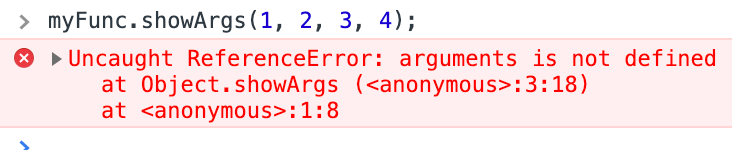
Arrow functions do not have an arguments binding. However, they have access to the arguments object of the closest non-arrow parent function. Named and rest parameters are heavily relied upon to capture the arguments passed to arrow functions.
In case of a regular function:
let myFunc = {
 showArgs(){
  console.log(arguments);
 }
};
myFunc.showArgs(1, 2, 3, 4);

In case of an arrow function:
let myFunc = {
  showArgs : () => {
  console.log(...arguments);
 }
};
myFunc.showArgs(1, 2, 3, 4);
3. Use of this keyword
Unlike regular functions, arrow functions do not have their own this. The value of this inside an arrow function remains the same throughout the lifecycle of the function and is always bound to the value of this in the closest non-arrow parent function.


4. Using new keyword
Regular functions created using function declarations or expressions are constructible and callable. Since regular functions are constructible, they can be called using the new keyword.
However, the arrow functions are only callable and not constructible, i.e arrow functions can never be used as constructor functions. Hence, they can never be invoked with the new keyword.
let add = (x, y) => console.log(x + y);new add(2,3);


5. No duplicate named parameters
Arrow functions can never have duplicate named parameters, whether in strict or non-strict mode.
It means that the following is valid JavaScript:
function add(x, x){}It is not, however, when using strict mode:
'use strict';
function add(x, x){}
// SyntaxError: duplicate formal argument x
With arrow functions, duplicate named arguments are always, regardless of strict or non-strict mode, invalid.
(x, x) => {}
// SyntaxError: duplicate argument names not allowed in this context


